

A resource for those seeking information on organizing and transforming spaces.
Smart Kitchen Zones That Save Time
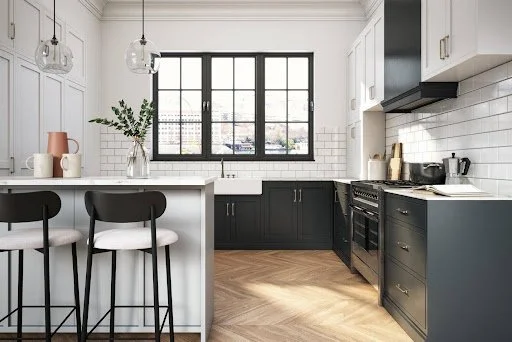
A well-organized kitchen supports faster meal preparation, easier cleanup, and a more enjoyable cooking experience. Instead of focusing only on appearance, an efficient kitchen is divided into practical work zones based on everyday tasks. This approach reduces unnecessary movement and keeps frequently used items within easy reach.
A well-organized kitchen supports faster meal preparation, easier cleanup, and a more enjoyable cooking experience. Instead of focusing only on appearance, an efficient kitchen is divided into practical work zones based on everyday tasks. This approach reduces unnecessary movement and keeps frequently used items within easy reach.
Create Dedicated Work Areas
Each kitchen activity benefits from its own designated space. A preparation zone should be located near cutting boards, knives, mixing bowls, and frequently used utensils. Keeping these items together reduces interruptions while cooking.
A cooking zone works best around the stove or cooktop with pots, pans, cooking oils, and spices stored nearby. Likewise, a cleanup zone should include dish soap, trash bins, recycling containers, and drying racks close to the sink and dishwasher. Grouping supplies by purpose makes daily routines more efficient.
Organize Storage by Frequency of Use
The most commonly used items deserve the easiest access. Everyday dishes, glasses, cookware, and pantry staples should be stored between waist and shoulder height whenever possible.
Seasonal serving dishes, specialty appliances, and rarely used cookware can be placed in higher cabinets or lower storage areas. Drawer organizers, pull-out shelves, and labeled containers also help reduce clutter while making items easier to locate.
Plan for Future Needs
Kitchen layouts should support both current routines and future household changes. Families may need additional food preparation space, while homeowners who enjoy entertaining often benefit from larger serving areas or expanded storage.
For larger renovation projects, consulting experienced home remodeling contractors can help homeowners evaluate layout improvements that increase workflow, storage capacity, and overall efficiency without sacrificing style. Planning ahead often reduces the need for costly modifications later.
An efficient kitchen depends more on organization than on size. Clearly defined work zones, practical storage solutions, and a layout that supports daily habits help save time while reducing frustration. Small improvements that simplify cooking, cleaning, and organization create a space that feels more comfortable and supports smoother routines for everyone in the household. Check out the infographic below to learn more.

The Rise of Smart Homes: How Technology Is Transforming Living Spaces
Technology is shaping the way we live, and it’s also changing our standards, especially when it comes to convenience. Luckily for us, technology has the power to make our lives a whole lot more convenient, and we don’t seem to mind it. And when this convenience starts knocking on our doors, technology slowly begins transforming our living spaces, whether it’s for better or worse.
Technology is shaping the way we live, and it’s also changing our standards, especially when it comes to convenience. Luckily for us, technology has the power to make our lives a whole lot more convenient, and we don’t seem to mind it. And when this convenience starts knocking on our doors, technology slowly begins transforming our living spaces, whether it’s for better or worse.
Your Home Can Finally Learn Your Routine
There’s nothing more irritating than experiencing a sensory issue after a long day at work. You get home, it’s too hot, and you just don’t have the patience to wait for the room to cool down. But that can all be in the past, all thanks to technology. Devices such as the Google Nest Learning Thermostat can notice patterns in your day and learn when you're usually home. They can adjust temperatures without you constantly fiddling with settings.
You’re no longer filling the useful space with a range of different devices. Instead, you get this next-gen thermostat, answer a few questions, and let it settle into your habits. Over time, your heating and cooling become less wasteful. Not only are you saving space, but you’re also saving money.
Security Is Getting Smarter
Traditional locks only work after someone reaches your front door. Modern systems start paying attention long before that. An average modern doorbell lets you see who's outside, and it likely allows you to talk to visitors from almost anywhere. Some even feature motion alerts, so you get a notification before anyone presses the bell, or a remote door lock.
That changes everyday life in so many ways. For example, if your friend arrives early, you can unlock the door remotely, or if you’re waiting for a parcel, it’s safe to check who's outside without opening the door. The best part is that you don't have to hide spare keys under flowerpots anymore, and once you try it out, going back feels inconvenient.
Smart Features Are Starting to Influence Property Value
People aren't only buying homes for bigger kitchens. It’s not the nicer backyards they want anymore. At least these aren’t the only drivers. Connected technology is becoming part of the decision. When buyers compare neighbourhoods, whether they’re in Sydney or Brisbane, this is what they want to see.
Even when you examine individual neighbourhoods and look at the trends such as all the houses sold in Kedron in recent years, you can spot a pattern. Homes with thoughtful smart lighting and efficient climate control are more favourable. People also prefer homes with features such as reliable security systems, and integrated automation.
If you’re selling or trying to increase the value of your home, that doesn’t mean you should automatically buy anything you can get your hands on. Start with practical upgrades that save time and improve your comfort first. Then move on to options that reduce energy use. Build from there.
Lighting That Does More Than Brighten a Room
Lighting has become one of the biggest improvements inside smart homes. You see that in examples such as Philips Hue bulbs, which offer millions of colour options, as well as automation. Lights can slowly brighten in the morning and switch off when everyone leaves. With smart lights, you can create different scenes for reading, watching movies, or cooking.
Some even connect to your Wi-Fi. Individual bulbs can also be grouped into rooms and controlled with voice assistants. You stop thinking about light switches quite so much, as they become more like a decorative feature.
Tiny Sensors Are Running the House
The most useful smart devices are often the ones you barely notice, and once you install them, you will never want to let go of this convenience. Aqara Door and Window Sensors are great examples of that. They can detect when a door opens, or when someone enters a room. Their advanced models even go beyond simple motion detection by being able to recognise whether you're still in the room, even while sitting quietly reading or watching television.
If you don’t think that’s big, wait until you try it. Your lights don't suddenly turn off while you're relaxing, and automations become much more reliable. And it’s not about convenient relaxation. Add a water leak sensor under your washing machine or kitchen sink, and you'll receive an alert before a small leak turns into an expensive repair.
Conclusion
Technology will continue to shape and transform our living spaces. And while you don’t have to integrate these gadgets into your home, it’s clear that they offer benefits for those who want this elevated level of convenience that smart devices offer.

How to Organize Smart Home Devices, Hubs, and Chargers
A well-organized smart home is easier to use, safer to maintain, and simpler to upgrade over time. From smart speakers and hubs to chargers, cords, and control panels, every device needs a clear place and a reliable power setup. With the right system, and help from an electrician when wiring or electrical work is involved, smart home technology can feel cleaner, calmer, and more dependable.
We partnered with a home improvement company for this post. The opinions in the post are honest. All reviews and opinions expressed in this post are based on our personal views. We are excited because we know you will love it.

A well-organized smart home is easier to use, safer to maintain, and simpler to upgrade over time. From smart speakers and hubs to chargers, cords, and control panels, every device needs a clear place and a reliable power setup. With the right system, and help from an electrician when wiring or electrical work is involved, smart home technology can feel cleaner, calmer, and more dependable.
Smart Home Organization Basics
Smart home organization means giving every connected device, cord, charger, hub, remote, adapter, and accessory a logical place in the home. It is not just about making technology look tidy. It is about creating a system that makes devices easy to use, easy to charge, easy to troubleshoot, and easy to expand as new electrical products are added.
This kind of organization connects the physical side of home technology with the digital side. It is not only deciding where a smart speaker, charger, router, or remote should sit. It is deciding how each device is powered, named, accessed, reset, updated, stored, and eventually replaced.
Smart home clutter builds quickly because most devices come with their own power cords, charging cables, adapters, bridges, remotes, mounts, batteries, setup paperwork, setup cards, QR codes, wall plates, sensors, and app instructions. Many of these items are small, visually similar, and used in different parts of the home. The device may be installed in one room, but its spare parts often land somewhere else.
Smart home clutter also happens because technology keeps expanding. A homeowner may start with a thermostat and a few smart bulbs, then add cameras, speakers, locks, plugs, sensors, streaming devices, tablets, robot vacuums, and wearable chargers. Each addition creates a small storage decision. Without a repeatable system, those small decisions turn into tangled drawers, overloaded outlets, mystery cords, and equipment that is hard to reset when something stops working.
The clutter usually comes from three common problems: no assigned location, too many duplicate accessories, and cords that are hidden without being labeled. A good organization system turns the scattered technology layer into something predictable: devices stay where they are used, accessories are grouped by purpose, and cords are labeled before they become mystery cables.
A better way to think about smart home organization is as a household operating system. Each device needs five things: a useful location, a clear digital name, a safe power source with surge protection, a labeled accessory home, and a plan for what happens when it is replaced.
Smart Home Organization Ideas For Devices
The best way to decide where smart home items belong is to organize them by how they are used, not by where they happened to land. A smart home item should live where it creates the least friction. Devices that are used daily should live close to the activity they support. Smart speakers belong where voice control is most useful, such as kitchens, living rooms, offices, and bedrooms. Remotes should stay near the screens, lights, shades, or audio systems they control. Chargers should be placed where devices naturally rest at the end of the day. Hubs and bridges belong where they can stay connected, ventilated, and easy to reach. Spare cords, mounts, and adapters belong in labeled storage, not in the room by default.
A helpful approach is to create a simple "home tech map." Walk through each room and list the smart devices, remotes, cables, hubs, and chargers used there. Then assign each item one of three homes: visible and accessible, hidden but reachable, or stored as backup. Visible items include remotes, tablets used as control panels, and everyday chargers. Hidden but reachable items include hubs, bridges, routers, modem equipment, and cable connections. Backup items include spare cords, adapters, mounting pieces, manuals, and extra batteries. These smart home organization ideas make the system easier to follow because every item has a clear role.
One standout method is to sort every item by access level. Daily-use items should be visible or within arm’s reach. Weekly-use items can be nearby but tucked away. Rarely used accessories can be stored in labeled bins. Emergency-use items, such as router power cords, security hub adapters, backup keys, and alarm panel instructions, should be easy to find fast during an electrical emergency.
Accessories should be grouped in small labeled containers rather than mixed into general junk drawers. One bin can hold smart lighting accessories, another can hold camera mounts and charging cords, another can hold networking items, and another can hold extra remote batteries. This makes the system easier to maintain because every new item has a category before it becomes clutter.
Homeowners can also create a small "tech onboarding zone." Before a new smart device is installed, place it in one setup area and handle the details first. Label the cord, photograph the QR code, save the model number, store the manual, decide where spare parts will go, and remove any older device from the home and app. This is one of the most practical smart home organization ideas because it prevents the common problem of installing the exciting new device while the accessories become instant clutter.
The best location is not always the most hidden location. A perfectly concealed hub that is difficult to reset is not well organized. A remote stored beautifully across the room from where people watch TV will not stay there. The system should make the correct habit the easiest habit, and the best smart home organization ideas are the ones that match how the household actually uses each device.
Smart Home Hub Organization
Smart home hubs, routers, bridges, and control panels need a balance of access, airflow, signal strength, and appearance. These items should not be buried in closed drawers, stacked under papers, hidden behind heavy furniture, buried behind books, or sealed inside closed cabinets. They need enough space to stay cool, send reliable signals, have stable power, and remain easy to reach when something needs to be reset or replaced.
A clean setup often starts with one central "technology zone." This may be a media cabinet, office shelf, utility closet, entry cabinet, structured wiring panel, or a ventilated cabinet near the center of the home. The key is to keep the equipment grouped, ventilated, labeled, and easy to inspect without turning it into a pile. Routers and hubs can sit on open shelving, inside a ventilated cabinet, or on a wall-mounted rack. Bridges and smaller hubs can be mounted vertically with adhesive mounts or short shelves to keep them from spreading across a countertop. Short cables, mounted power strips, vertical stands, small shelves, and cable labels can make the area feel intentional instead of improvised. This is where smart home hub organization can make the biggest difference.
The most overlooked rule is reset access. A homeowner should be able to identify and reset the router, main hub, security bridge, or lighting bridge quickly without pulling apart an entire cabinet. Use labels on the front edge of shelves or on the plug end of each cable. Leave enough slack to move one device without unplugging three others.
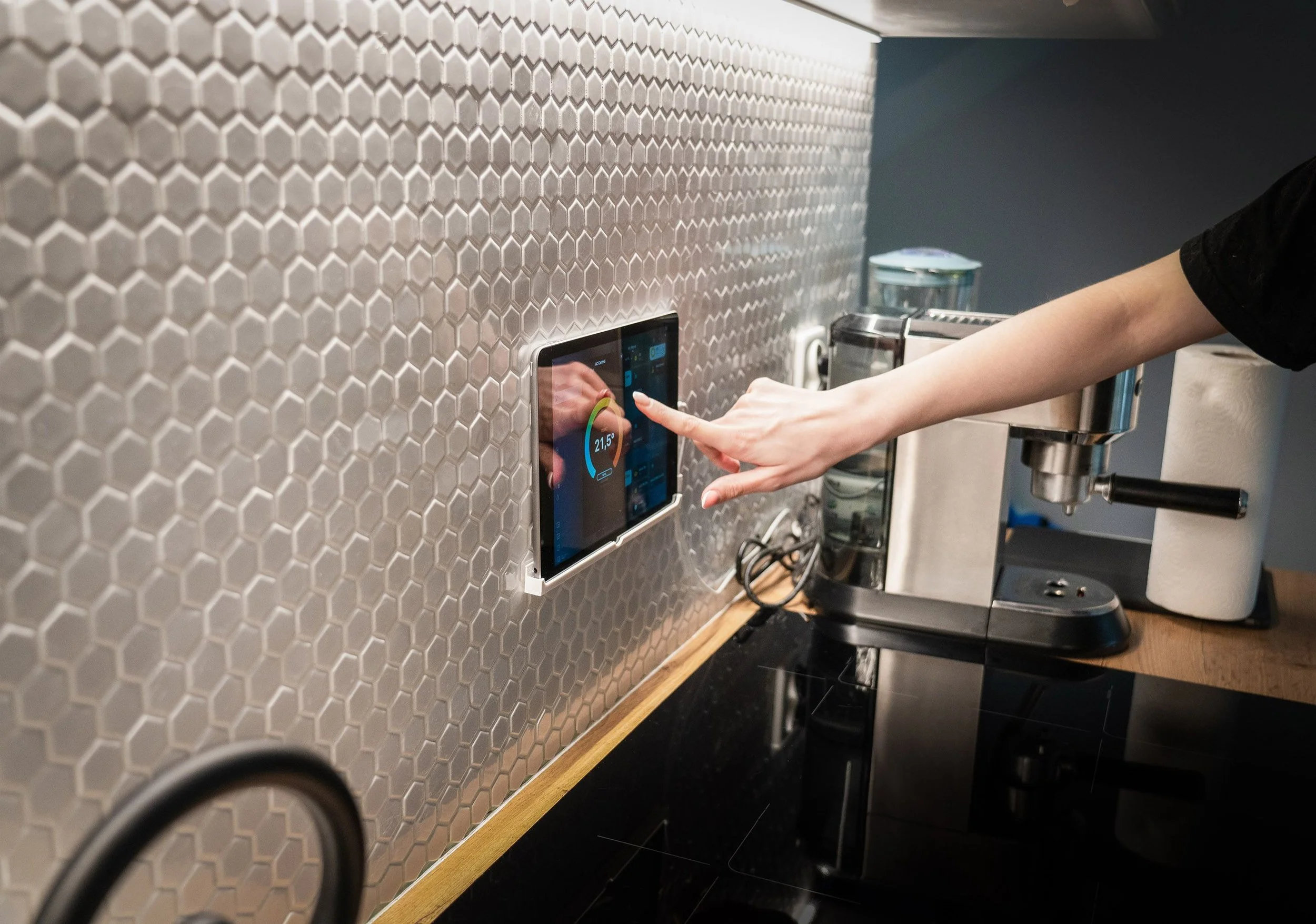
Control panels should be placed where they support daily routines. A wall-mounted tablet or touchscreen may work well near the kitchen, entryway, bedroom, primary bedroom, or main living area. The cleanest setups use concealed power where possible, short charging cables, labeled wall adapters, and a small cable channel that blends with the wall. If a tablet or touchscreen is used as a control center, the charging cable should be concealed but still serviceable.
The goal is not to hide technology so completely that it becomes difficult to service. The goal is to make it visually quiet while keeping every reset button, port, and label reachable. A clean smart home hub organization area is not one where the technology disappears completely, and strong smart home hub organization keeps service access simple. It is one where the homeowner can reach the right part immediately when the system needs attention.
Smart Home Organization Tips By Room
Grouping smart home devices works best when the system matches the way the household actually lives. Some items should be grouped by room, some by function, and some by daily routine. A room-based system is useful for devices that stay in one place, such as smart bulbs, speakers, sensors, cameras, thermostats, plugs, and remotes. A function-based system is better for accessories that support a category, such as lighting, security, entertainment, networking, cleaning, batteries, or charging. A daily-use system is best for phones, tablets, watches, earbuds, handheld remotes, game controllers, and portable speakers.
For each room, keep only the technology that serves that space. Living rooms may need TV remotes, streaming devices, speakers, game controllers, and lighting controls. Bedrooms may need chargers, sleep devices, smart lamp controls, and watch chargers. Entry areas may need security panels, camera controls, door lock accessories, or a shared charging spot. Home offices may need networking gear, docking stations, backup drives, and cable storage. These smart home organization tips help prevent every room from becoming a storage area for every device.
Labeling also matters. Device names in the smart home app should match the physical room and purpose, such as "Kitchen Speaker," "Kitchen Pendant Lights," "Front Door Camera," "Living Room Lamp," or "Bedroom Speaker." This keeps voice commands, app controls, and physical organization aligned. When the digital names and physical locations match, the whole system becomes easier for everyone in the home to understand.
Function-based grouping is better for spare parts and accessories. Keep smart lighting parts together, camera mounts together, networking items together, batteries together, and charging cables together. This prevents one drawer from becoming a graveyard of unrelated tech.
Daily-use grouping is for the items people touch constantly. These items need obvious landing zones, not hidden storage. A family charging shelf, remote tray, or entry console can reduce daily scatter more effectively than a complicated storage system.
The key is to avoid organizing only by category if the household does not live that way. A perfect bin of chargers in a closet will fail if everyone charges devices in the kitchen. A beautiful remote drawer will fail if the drawer is across the room from the sofa. The system should follow the path of use. The most useful smart home organization tips are simple, repeatable, and easy for everyone in the home to maintain. Good smart home organization tips should also leave room for changes as devices move, routines shift, or new products are added.
Organizing Cords And Chargers
Organizing cords and chargers starts with sorting by type, reducing what is actually useful, and storing everything in a way that prevents tangling. Start by gathering every loose cord, wall adapter, charging brick, extension cable, and device-specific charger in one place. Match each cord to a device when possible. Anything broken, obsolete, unsafe, or unidentifiable after sorting should be recycled through an appropriate electronics recycling option.
The remaining cords should be divided by category. Common groups include USB-C cables, Lightning cables, micro-USB cables, power bricks, laptop chargers, camera cables, smart device adapters, extension cords, and specialty cables. Each cord should be wrapped loosely with a reusable cable tie, labeled when needed, and stored in a divided drawer, clear pouch, small bin, or cable organizer case. Organizing cords and chargers by category makes it easier to find the right item without digging through a mixed pile.
Avoid large mixed baskets for cords. They look convenient at first, but they usually become knot traps. A better system uses smaller compartments, one category per section. Cords become tangled when they are stored as a mass instead of as individual tools. A good cord drawer should allow someone to pull out one cable without disturbing all the others.
Active chargers should stay where charging actually happens, such as a nightstand, desk, entry console, or charging station. Backup chargers should be stored separately in labeled storage. This one distinction solves a lot of clutter. A nightstand cable, kitchen charging cable, and office cable are active. Extra USB cords, old charging bricks, and rarely used adapters are backups.
Label anything that belongs to a specific product, especially camera chargers, smart hub power cords, robot vacuum adapters, speaker cables, and specialty remotes. If a cord cannot be identified, place it in a temporary "unknown" section with a review date. If no one claims it after a reasonable period, recycle it responsibly rather than letting it live forever in a drawer.
For families, labels can be more useful than perfect folding. "Tablet charger," "guest charger," "watch charger," and "travel charger" are more helpful than a drawer that simply looks neat on the first day. This keeps countertops clear while still making the right cable easy to find. Organizing cords and chargers works best when the system is clear enough for everyone to use.
Cable Management Basics
Cable management improves both appearance and function. A neat cord setup keeps smart home devices from looking temporary, reduces trip hazards, protects cords from bending or pulling, and makes it easier to identify which plug belongs to which device. This is especially helpful behind media consoles, desks, routers, smart hubs, charging stations, and bedside tables. Good cable management reduces visual noise while preserving access.
Start by shortening the visible path of each cord. Use the closest practical outlet, coil extra length loosely with reusable ties, and route cords along furniture legs, baseboards, the back of cabinets, or the backs of furniture. Cord clips, raceways, cable sleeves, under-desk trays, and adhesive mounts can help guide cables without creating a messy bundle. Power strips should be mounted off the floor when possible, where plugs can be seen and reached, rather than left in dusty piles on the floor.
Labels are what make cable management useful long-term. Each cord should be labeled near the plug, especially behind TVs, routers, hubs, desks, office equipment, and charging stations. Label both the device end and the plug end when possible. Simple labels like "Router," "Living Room Hub," "Camera Bridge," "TV Backlight," "Wi-Fi router," "soundbar," or "living room lamp" prevent confusion during troubleshooting. They also prevent someone from unplugging the wrong device while cleaning or rearranging furniture.
Safety should guide the setup. Keep cords loosely secured rather than tightly bent, avoid running power cables under rugs, pinching cords behind heavy furniture, or overloading outlets. Keep power supplies and equipment ventilated, especially around hubs, routers, and charging stations. Cable management should not trap heat or make it difficult to inspect a worn cord. A neat setup should still be safe, flexible, and easy to adjust. The best setup looks calm, but it still lets the homeowner see, label, unplug, and replace what matters.
Home Charging Station Setup
A home charging station gives everyday devices one reliable landing place. It works best in a location where people already drop items, such as an entryway cabinet, kitchen counter, mudroom shelf, home office, office credenza, bedroom dresser, or family command center. If the station is too far from daily routines, devices will continue to scatter.
Start with the devices that need charging every day: phones, tablets, smart watches, earbuds, remotes, game controllers, portable speakers, e-readers, rechargeable batteries, and smart home control tablets. Choose a charging dock, divided tray, drawer insert, shelf, or small cabinet that can hold those items without stacking them. The station should have enough spaces for today’s devices plus a little room for growth.
Add a power strip or multi-port charger, then use short cables to reduce extra cord length and cord bulk. Cable clips can keep each charger in place so cords do not fall behind the furniture. For a cleaner look, place the power strip inside a ventilated cable box, drawer, or cabinet with cord openings. If the station is inside a drawer or cabinet, make sure there is ventilation and that cords are not pinched.
A strong home charging station also has simple rules. Each device gets a specific spot. Cables stay attached to the station. Backup cords are not mixed into the daily charging area. Shared family devices should be labeled or assigned a slot, and each person or device type can have a marked space.
A charging station also works better with boundaries. It should not become a storage area for every spare cord in the house. Keep only the active charging cables there. Store backups elsewhere. This keeps the station easy to use and prevents it from turning into another tech junk drawer. The home charging station should feel easy enough to use every day, because that is what keeps devices from spreading across countertops and nightstands.
How To Organize Smart Home Wiring
Smart home wiring should be organized with four priorities in mind: concealment, labeling, access, and safety. Hidden wiring looks better, but it should never be so hidden that homeowners cannot identify, unplug, inspect, or replace it. The best systems create clean routes for wires while keeping key connection points easy to reach.
For visible areas, cords can be routed through paintable cable raceways, cord channels, cable sleeves, behind furniture, along baseboards, inside media cabinets, through desk cable trays, under-desk trays, and media cabinet openings. For more permanent installations, such as wall-mounted TVs, cameras, speakers, access points, and control panels, homeowners may need in-wall rated cables, proper wall plates, proper cable types, and safe installation methods. Low-voltage wiring and power wiring should be handled according to local electrical codes, and permanent electrical changes should be done by a qualified professional.
Every wire should be labeled at both ends whenever possible. This is especially important for routers, switches, hubs, camera systems, entertainment centers, and structured wiring panels. Labels should identify the device, room, and purpose. For example, "Office Access Point," "Front Door Camera," "Living Room TV Ethernet," "Office Ethernet," "Living Room Hub," or "TV Power." Keep a simple wiring list, wiring map, or photo record of the setup so future changes are easier. A photo of the back of the router, media console, or structured wiring panel can also help before anything is moved.
Accessibility matters just as much as concealment. Leave service loops where appropriate, avoid sealing important connections behind furniture, and do not make a setup so custom that replacing one device requires dismantling the whole area. Good wiring organization makes the home look cleaner while making repairs, upgrades, and troubleshooting much less frustrating. Smart home wiring should be clean enough to disappear into the room, but organized enough to explain itself when something needs to be fixed.
Maintaining Smart Home Organization
The system is easier to maintain when every new device goes through the same setup process. Before adding a new product, decide where it will live, what outlet it will use, where its charger will stay, what cord or adapter it uses, what app controls it, what name it will have, and where any spare parts will be stored. This prevents the common pattern of installing the device and letting the extra pieces drift into random drawers.
After installation, label the cord, name the device clearly in the smart home app, and add any extra parts to the right storage category. Keep manuals, setup codes, warranty details, and app information in one digital or physical folder. Take a quick photo of complicated wiring setups before closing cabinets or moving furniture back into place.
A helpful rule is "add one, resolve one." When a new charger, remote, hub, camera, sensor, or smart speaker is added, check whether an older item should be removed, recycled, renamed, or stored elsewhere. Also remove old devices from smart home apps so the digital system does not become as cluttered as the physical one.
Maintenance should include a quick review of both physical and digital clutter. Every few months, check for unused chargers, duplicate cords, mystery cables, dead batteries, obsolete devices, broken chargers, missing labels, and accessories that no longer belong to anything in the home. Update device names and labels if rooms change, and review automations that no longer match the household’s routines. Make sure hubs and routers still have airflow and that charging stations have not become catchall storage.
A smart home system should have room to change. Leave a little extra space in cord storage, charging areas, and hub zones so the system can grow without becoming crowded. Keep organizers modular, and avoid permanent cable routes for devices that may be upgraded soon. The best smart home organization system is not frozen in place; it is easy to update as the home’s technology changes. The goal is not to create a perfect setup once. The goal is to create a system that can accept new technology without turning every upgrade into a new clutter problem.
The Digital Tools Powering Modern Field Services
In today’s fast-paced market, field service teams face rising customer demands and tighter margins. Manual processes and paper forms no longer support the speed and accuracy needed to stay competitive. By integrating robust CRM softwarewith digital field service solutions, companies can bridge the gap by transforming scheduling, communication, and customer data management into seamless workflows.
In today’s fast-paced market, field service teams face rising customer demands and tighter margins. Manual processes and paper forms no longer support the speed and accuracy needed to stay competitive. By integrating robust CRM software with digital field service solutions, companies can bridge the gap by transforming scheduling, communication, and customer data management into seamless workflows.
In this article, you’ll learn how to leverage field service solutions to:
• Automate scheduling and dispatch to reduce drive time and boost first-time fix rates
• Empower customers with self-service portals and proactive alerts
• Track inventory and assets in real time, avoiding return trips
• Equip technicians with mobile apps for offline access and instant reporting
• Streamline billing and accelerate cash flow with automated invoicing
• Leverage analytics to monitor key performance metrics and drive continuous improvement
• Adopt specialized solutions for landscaping and pest control
• Prepare for emerging technologies such as AR, AI, and IoT
Next, we explore digital transformation in field service, evaluate key field service solutions, and review the core technologies driving this shift.
Understanding Digital Transformation in Field Service
Digital transformation in field service means replacing manual and paper-based workflows with integrated field service solutions or field service management software. This shift automates tasks such as scheduling, dispatching, and real-time tracking. It also enables streamlined customer communications through automated reminders and portals.
What Is Digital Transformation?
Digital transformation uses technology to connect back-office systems, mobile workforce tools, and customer data. Integrations between field service management (FSM) solutions, CRM systems, and ERP systems maintain consistent information and minimize data errors.
Key Benefits
Efficiency Gains
Automated scheduling and real-time monitoring can improve technician utilization by up to 50% and cut service delays by 30%.
Competitive Advantage
Data analytics and AI help optimize routes and resource allocation, lowering operational costs and boosting profitability.
Scalability
Scalable field service solutions enable businesses to add technicians, expand service areas, and incorporate new features without disrupting their workflows.
Customer Satisfaction
Self-service portals and live status updates build trust and improve transparency. Automated appointment reminders reduce no-shows and keep schedules on track.
Core Digital Tools Powering Field Service Operations
Modern field service providers rely on a suite of field service solutions and digital tools to streamline operations, boost productivity, and improve customer satisfaction.
Customer Self-Service Portals
• Schedule or reschedule appointments online
• View service history and invoices
• Track technician arrival windows
A well-designed portal reduces inbound calls and empowers customers to get instant updates. Integration with backend systems ensures that information stays accurate across all channels.
Intelligent Scheduling & Dispatch
• Route optimization based on traffic and skills
• Automated assignment rules tied to certifications or regions
• Real-time updates when jobs change
These features drive higher first-time fix rates and minimize drive time. Dispatchers gain visibility into technician status through intuitive dashboards.
Real-Time Inventory Management
• Automatic stock level alerts
• Integrated parts catalog with mobile lookup
• Synchronization between warehouse and vehicle inventory
By tracking parts in real time, companies reduce overstock and ensure technicians arrive prepared.
Mobile Workforce Empowerment
• Access job details, customer history, and manuals offline
• In-app time tracking and digital signature capture
• Photo and video uploads for issue verification
Mobile tools knit together office and field teams. Technicians stay informed and can report status instantly.
Automated Billing & Invoicing
• Auto-generation of invoices upon job completion
• Digital payment links embedded in notifications
• Integration with accounting or ERP systems
This streamlines revenue recognition and cuts error-prone data entry.
Customer Communication Tools
• SMS and email alerts for appointment reminders
• Two-way messaging to confirm details
• In-app chat or chatbot support
Consistent, timely updates keep customers informed and free up staff time.
Performance Analytics
• Technician utilization and first-time fix rates
• Average job durations and travel times
• Customer satisfaction scores and feedback trends
By monitoring key performance indicators, managers can identify training needs, refine processes, and optimize resource allocation.
Integrating Specialized Software for Landscaping and Pest Control
Specialized field service solutions and business software for landscaping and pest control address needs in plant design, chemical management, and regulatory compliance. By combining design, scheduling, and mobile dispatch, these tools improve accuracy, client communication, and ROI. Additionally, modern landscape software enables teams to generate digital designs, overlay GIS data, and collaborate with clients in real time.
Key Features of Landscaping Software
• Plant Database & Site Design
– Access plant libraries with filters for growth habits, water use, and climate
– Integrate GIS data to overlay designs on real-world topography and soil maps
– Import hand sketches via digital tools to refine conceptual layouts
• Visual Rendering & Analysis
– Generate photorealistic previews with Twinmotion, Lumion, or D5 Render
– Use AutoTURN integration to test vehicle paths for safe, code-compliant plans
– Leverage motion-sensor measurements for exact site dimensions, ensuring safety standards for both equipment and clothing used in the field
Key Features of Pest Control Software
• Automated appointment scheduling with customer reminders
• Chemical inventory tracking and batch labeling for safety and compliance
• Treatment plan templates and history logs for each client
• Route optimization to maximize technician time and fuel efficiency
• Offline mobile access to service records and payment processing
Comparing with General Field Service Solutions
Specialized software delivers industry-specific modules beyond core FSM features. Landscaping tools blend CAD design and plant data, while pest control platforms focus on chemical workflows and regulatory reporting. This focus can cut revisions, speed job costing, and raise first-time fix rates compared to general field service solutions.
Choosing the Right Field Service Provider
• Modular architecture lets teams pick needed features like CRM, scheduling, or reporting
• Mobile app support with offline access ensures uninterrupted work
• Scalability to add users and modules without disrupting operations
• Responsive vendor support and training streamlines onboarding and reduces downtime
• Integration APIs link to existing ERP or accounting systems for data consistency
By selecting a specialized platform, landscaping and pest control businesses can tackle sector challenges, streamline workflows, and boost profitability.
Emerging Technologies Shaping the Future of Field Service
New technologies extend core FSM capabilities to drive faster resolutions and greener operations. From live remote guidance to predictive diagnostics, these tools help teams adapt and innovate. By integrating energy-efficient asset management and low-emission routing, field service providers play a critical role in the maintenance and optimization of sustainable homes for environmentally conscious clients
AR/VR Remote Assistance
Augmented reality overlays diagrams and step-by-step instructions in a technician’s view. Remote experts guide on-site staff via AR annotations, cutting travel for specialists. Virtual reality simulations train teams for complex repairs before dispatch. Integration with field service platforms ensures documentation sync.
AI-Driven Image Recognition
Machine learning analyzes photos to spot equipment faults, turf diseases, or pest infestations. Fast on-device inference speeds diagnoses and suggests fixes. Mobile app integration streamlines inspection reports and automates recordkeeping. Insights feed proactive maintenance workflows.
IoT-Powered Predictive Maintenance
Sensors on mowers, sprayers, and other assets record metrics such as temperature and vibration. Analytics detect anomalies and issue maintenance alerts before failures occur. Predictive care reduces downtime and extends equipment life. Remote dashboards offer full asset visibility.
Sustainability & Carbon Tracking
Route optimization calculates low-emission paths that balance time and fuel efficiency. Carbon-tracking modules log fleet emissions and manage offset credits. Monitoring emissions trends drives continuous improvement. These features support sustainability targets and appeal to eco-conscious clients.
Best Practices for Implementing Field Service Software
Rolling out field service software requires strategic planning and stakeholder buy-in. By following proven practices in team leadership, KPI measurement, staff training, and vendor selection, you can unlock efficiency gains and boost customer satisfaction.
Assigning Digital Champions
• Advocate for the new platform across teams
• Bridge communication between IT and field staff
• Gather feedback for continuous improvement
Measuring KPIs & Analytics
Manual processes cost small businesses $600 billion annually and consume nearly 5% of administrative time. Tracking the right metrics shows the impact of automation.
• First-time fix rate, boosted by real-time communication and live inventory
• Technician utilization and drive-time reduction
• Customer satisfaction via automated notifications and e-signature rates Use dashboards to monitor these indicators and refine workflows.
Training & Workforce Empowerment
Leading vendors deliver professional services, gold-level support, regional training, and webinars to keep teams up to date. Offer structured training that includes:
• Hands-on mobile app exercises
• Role-specific workflows for landscaping and pest control tasks, including outdoor safety essentials like hydration, protective gear, and mineral sunscreen
• Ongoing support through help desks and user forums
Partnering with Field Service Providers
Choose a vendor that unifies scheduling, dispatching, inventory, and customer portals in a single workflow. Look for:
• Integration APIs that connect to ERP or accounting systems
• Professional services and gold-level support options
• Proven expertise in landscaping and pest control
By partnering with trusted field service providers, you reduce manual errors, save time, and align the solution with your operational needs.
Conclusion
Modern field service teams face higher customer expectations and tighter budgets. By adopting digital field service solutions, from intelligent scheduling and mobile apps to specialized landscaping and pest control software, you can streamline workflows, cut costs, and boost first-time fix rates.
Emerging technologies like AR guidance, AI image recognition, and IoT-based predictive maintenance will further sharpen your competitive edge. Implementing these solutions requires clear goals, strong leadership, and ongoing training.
Key takeaways:
• Automate scheduling and dispatch with field service solutions to reduce drive time and improve utilization
• Empower customers with self-service portals and proactive alerts
• Track inventory and assets in real time to avoid return trips
• Equip technicians with mobile access, offline support, and instant reporting
• Accelerate cash flow through automated billing and invoicing
• Leverage analytics to monitor KPIs and drive continuous improvement
• Adopt specialized modules for landscaping and pest control
• Prepare for AR, AI, IoT, and sustainability features to stay ahead
Step into the future of field service solutions and transform every customer interaction into a success story.
Ellie Williams
Ellie Williams studied at Miami State University and majored in Marketing with a minor in creative writing. She enjoys doing freelance writing on general business, wellness, and lifestyle tips. During her free time, she enjoys catching up with friends and family or attending local events.